Unlock Galaxy Nexus Bootloader [How to][Guide]
Want to unlock the bootloader of your Galaxy Nexus; here is
a quick tutorial that should help you. Being a Nexus smartphone, unlocking the
bootloader of Android 4.0 powered Samsung Galaxy Nexus is fairly easy, but you
need to be sure by unlocking bootloader wipes your phone, so your phone will be
back to factory state after the following steps are completed. So make sure to make
a backup the necessary data/SMS/Call log etc.
STEP 1: First download this file (r3-galaxynexus-superboot.zip)
STEP 2: Download PdaNet and install, it
installs the required drivers to work with the following steps.
STEP 3: Extract the download zip to a folder using Winzip,
WinRAR, 7Zip or any compressing application of your choice.
STEP 4: Turn off your Galaxy Nexus
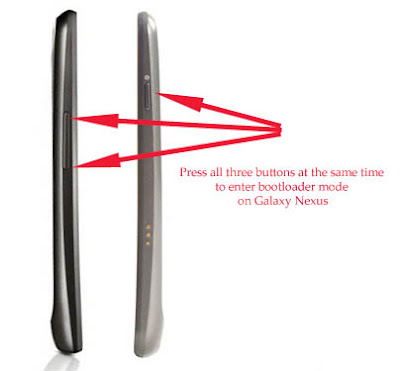
STEP 5: Turn on your Galaxy Nexus in Bootloader mode [How to
do that – Press 'volume up' and 'volume down' and ‘power button’ at the same
time] [See the image below].

STEP 6: Go to the extracted folder and press SHIFT and right
click, then click on “open a command window here”.

STEP 7: Type fastboot-windows
oem unlock in the command window and hit enter.

STEP 8: Your Galaxy Nexus will ask you that whether you are
sure that you want to unlock bootloader, press YES.

You are done, enjoy. Now if you also want to root you Galaxy
Nexus, then follow the guide at this link from STEP 6.
very help full information about Galaxy Nexus Android apps development
ReplyDeleteThanks for the informative article. You might also be interested in Top 10 Android Games
ReplyDeleteThe article you have shared here very good. This is really interesting information for me. Thanks for sharing! php Website development in Singapore
ReplyDelete